802.1x Explained
Every enterprise network has many devices types connecting to a network. Each require individual access to certain resources, file servers, printer servers, business applications, and general internet access. Devices could be owned by the business, such as corporate laptops and printers. And some might not, like IOT devices controlling HVAC systems with who knows what is installed on it.
Device segmentation becomes important here as you do not want a rogue HVAC controller scanning your network, nor a compromised laptop taking down your AC. There are many ways to get granular with device segmentation. One example using VLANs connected to an SVI on the firewall to isolate that network from other networks. Or using ACLs on and SVI on the router to block traffic in-out of that SVI. You could even get more granular with VLAN-ACLs to block intravlan traffic on the switch(es).
However, that’s not what we’re discussing today. That only lays the foundation for the problem. How do we let these devices connect to the network in a secure way. That’s what network access control products like Cisco ISE, Windows Network Policy Server (NPS), and FortiAuthenticator are used for.
The 802.1x Flow
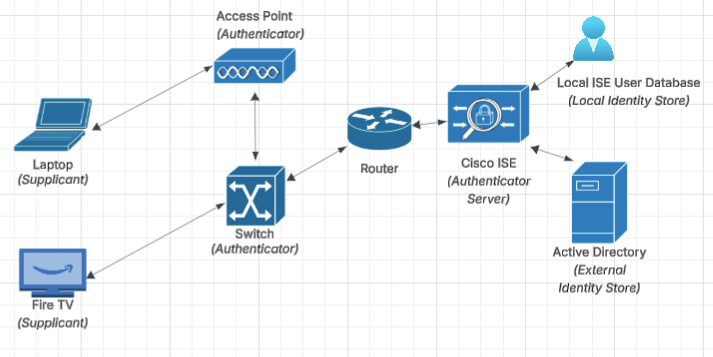
The flow begins with the endpoint, also known as the supplicant. This is the device initiating an 802.1x conversation. Looking at the laptop, it’s connecting to an access point advertising an SSID named “Enterprise” configured for WPA2-Enterprise, which is 802.1x authentication. The laptop connects to the SSID in an unathorized state, where the only frames it’s allowed to send is EAP frames. Essentially authentication frames sent to the access point to facilate authentication communication. At this point, the device does not have an IP address and cannot communicate IP.
Upon the access recognizing a new connection, it will send an EAP-Request to get the identity of the device. In an enterprise environment, this is usually the signed in users Active Directory (AD) credentials or a user/device certificate provisioned to the laptop from AD. Normally, the device knows to send authentication by a group policy object preconfigured in AD. These credentials can be clear text, but are usually (and rightfully should be) encrypted with an EAP encryption mechanism, like EAP-TLS or EAP-MSCHAPv2.
At this point, the access point (authenticator) now has the identity captured for the laptop (supplicant). The EAP negotation between the access point (authenticator) and Cisco ISE (authentication server) begins. The access point initiates conversation with Cisco ISE to negotitate EAP type by sending a RADIUS-Access-Request. Cisco ISE responds with acceptable EAP methods, such as EAP-TLS or EAP-MSCHAPv2. This access-challenge is then sent to the supplicant through the access point to accept this authentication type. The laptop is able to propose an alternative EAP method, which can be accepted or denied, depending on how Cisco ISE is configured.
Post 802.1x Authentication
Above, we covered the authentication work flow. However, there is another piece that usually comes after authentication, which is authorization. It’s the “what are you allowed to access” after the authentication. This is a set of policies in Cisco ISE that can restrict access to resources based off identity lookups. Authorization policies are processed top down, similar to firewall policy. Each authorization policy can have a unique conditions for authorization and a result for permitted/denied access.
Here’s some pseudo-ISE policy since my deployment is under construction.
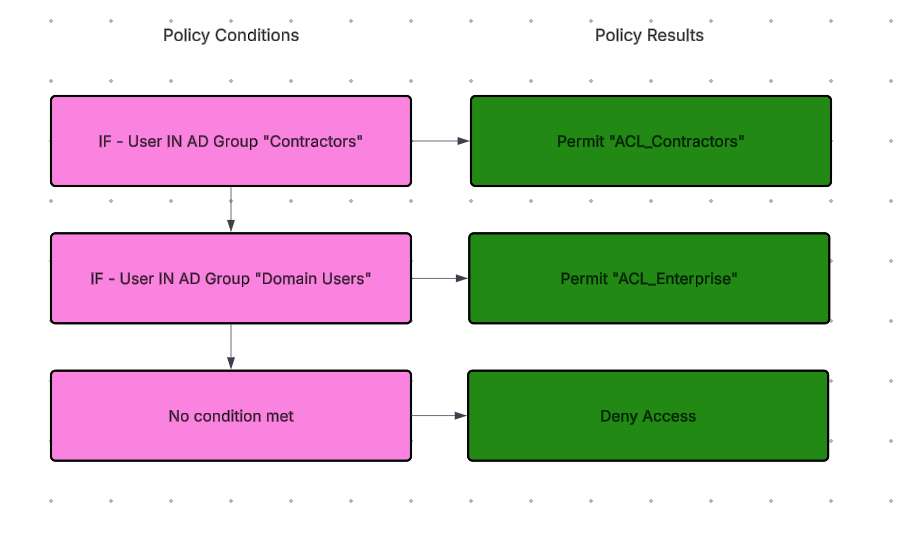
You can see based off AD group membership, we can applying different ACLs resulting in different access. For example, if someone is in the contractors group, their permitted access is the ACL_Contractors. This ACL will likely be deny all by default and have a few permit statements to very few servers.
Comparing that to a user not in the “Contractors” group and is in “Domain Users” they will receive access from “ACL_Enterprise”. This group would likely have a lot more internal access to things like file servers and business applications.
This kind of configuration requires configuring special ACLs among other authorization settings, which we won’t be going into in this article. But that’s just a glimpse of what else network access control servers can do post authentication.
Wrapping Up
Thats the quick and dirty explanation of how 802.1x authentication flow works. If you have any feedback, questions, or recommendations for other articles, please reach out to me in the contact section. Thanks for reading!